


Next Generation Wireless Lighting Control
Lighting Management Application
B2B Product
An internal lighting management tool, designed and developed to help engineers efficiently install, configure, and manage the next-generation wireless lighting control system. The challenge was to create a tool that made installation and device management engaging and thorough without causing user fatigue.
Product Type
Business Application
Device
iPad & Tablets
My Role
UX & UI Designer
Year
2018
About JouleiQ
JouleiQ provides next generation software defined wireless lighting contol system for large commercial places. The technolgy was developed on the Samsung ARTIK platform which helps the user to have an Intuitive, Secure, Easy, and Hassle free experience. The company uses on-premise server that enables more advanced scheduling and decision-making rules along with ML or AI-based edge intelligence and automation.

What is the problem?
The light installation engineers are able to install the lights and its control unit in the commercial premises but couldn't
-
Locate the installed lights in a given premises or space.
-
Remotely control the lights, its intensity and its environment colors.
-
Maintain an inventory of lights installed for a project.

What solution we offered?
The light installation engineers not only have a solution to every problem, they also now can manage engineers within the app.
-
2D map to scan surroundings and record the light locations.
-
Engineers can remotely control all light parameters.
-
Inventory management in installed locations and warehouses is greatly simplified by manual light scanning.
Discovery Phase

Stakeholder Research

End-User
Research

Competitor Research
We conducted research interviews with our stakeholders and end users (engineers) to identify any pain points they experienced during installation. Additionally, we performed a competitor study to highlight similarities, differences, and potential areas for improvement.
My research encompassed:
-
Gaining a deep understanding of user goals and needs
-
Identifying pain points within the current user journey
-
Evaluating the success of tasks through measurable outcomes
Define Phase
To develop the right solution for the real-time problems faced by engineers, we followed several key steps to create an effective and usable experience.
01
Created affinity maps using data gathered from research and interviews.
02
Assessed the severity of problems based on task criticality, impact, and frequency.
03
Conducted a small poll among engineers to prioritize issues from a usability perspective.
04
Developed scenarios and personas to define and narrow the scope of work.


Key User Persona

Installation Engineer
Kingsley
Age
36 years
Education
B.S. in Electrical Engineering
Gender
Male
Location
Mid-to-Large Metropolitan Area
Tech Comfort
Highly Proficient
Work Environment
60% On-site & 40% Office/Remote
Background
Kingsley, the engineer, oversees the entire installation process as well as the management of lights and their inventory.
He is responsible for assigning lighting to each area according to the space layout.
He also manages the installation, removal, and overall lighting operations within the designated space and has a thorough understanding of the advantages and disadvantages of each device.
Pain Points
-
It is challenging to identify defective lights before installation.
-
Determining which lights are not functioning in a specific area is difficult.
-
It is difficult to detect unnecessary lighting usage in large spaces.
-
Remote control operations for lighting are often inefficient.
-
Identifying lighting devices that require maintenance is challenging.
-
Testing all lights in a given area is time-consuming and requires significant manual effort.
Requirements
-
The goal is to detect lighting that is installed within a specific proximity.
-
An interface to verify the lighting's functionality after physical installation.
-
To save energy, set a fade time for the lighting to go off when no one is around the proximity.
-
Scheduling lights to operate for specific times and days, which can save more energy.
-
Options to change the color to suit the ambience and environment.
Ideate Phase
Before diving deep into specific designs, we created an user flow to help us visualize the main screens and features. We decided to go with sequential navigation for this application since it would contain multiple categories such as feed, explore, assign, install, and manage.
User Flow


Create Phase
Keeping in mind that a tablet or an iPad will be the most commonly used device, we took an approach of building responsive screens highlighting product features and technology which can bring focus to the business.
Wireframe


Design


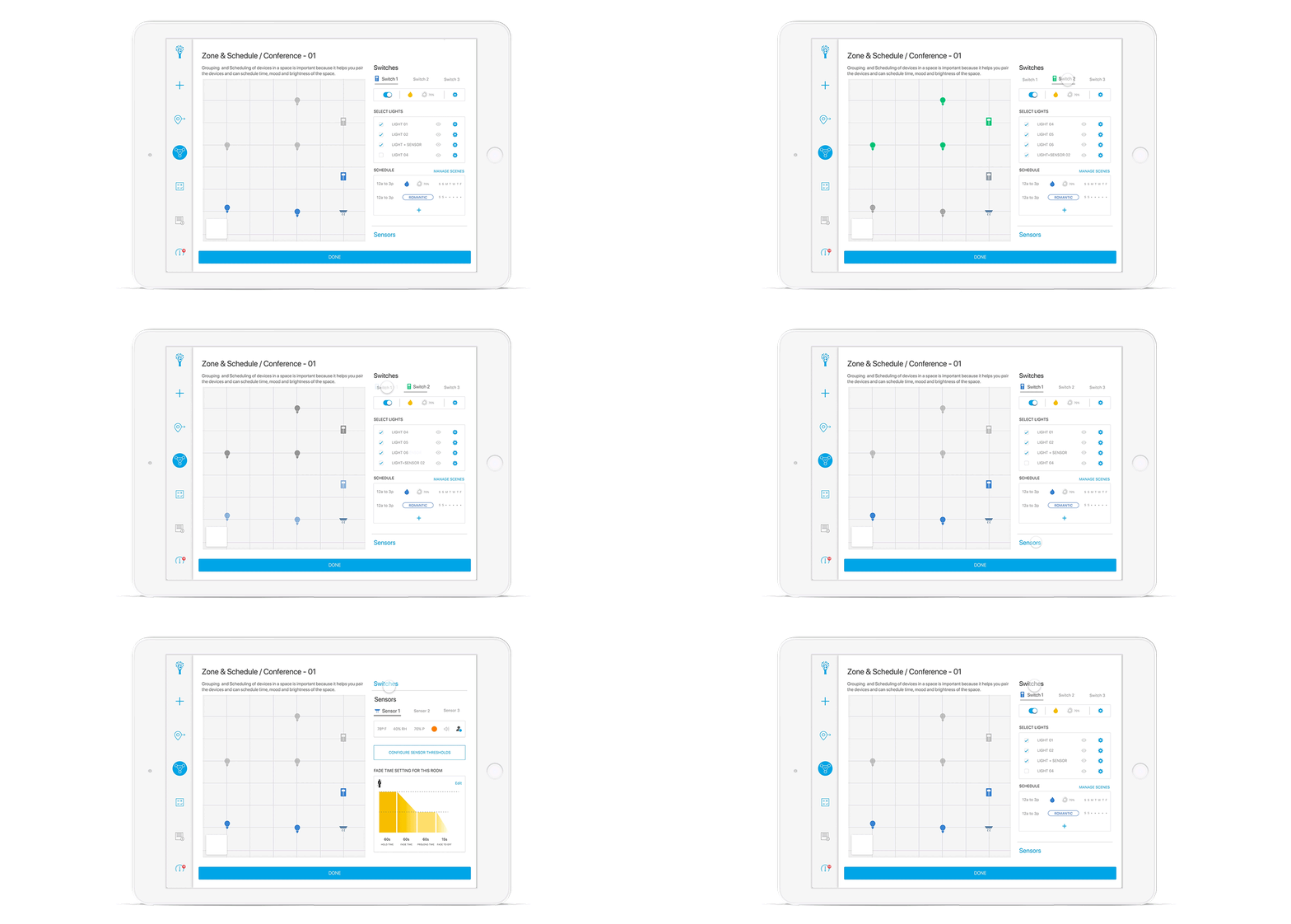
We had to understand Bluetooth mesh networking and design the workflows from a service design and design thinking perspective.
What we achieved
98%
9 seconds - faster than manual detection
Faster
Time Taken to Detect Nonworking Lights
71%
12-15 mins faster than manual process
Faster
Time Taken to Install New Lights
81%
Time Taken to Replace Nonworking Lights
Faster
Average of 10-12 mins to replace the lights
41%
Total Electrical Consumption of Lights
Reduced
Fading & Sensor features made the difference
Iterate Phase
We made only one iteration to the design, which was not an amendment but an enhancement: we added a new feature in the Manage section—a Data Visualisation Screen called "Sensor Board Overview." This screen informs users about light usage and provides relevant metrics like temperature, humidity, pressure and more.

Conclusion

We shipped the following
• Design System
• Design Specs
• Documentations (UX / UI work flow)
• High-fidelity Mockup (112 Screens)
Total tenure spent
6 Months
April 2018 - September 2018
Developed in
Both iOS and Android OS

 |  |
|---|